Step 3: Copy the Programm
Step 3 is to copy the characters of the Programm from the Web browser's window into the Zwischenablage. Later (in step 4) the characters will be copied from the Zwischenablage into Notepad. Step 3 involves some skills using Windows that you may not have used, yet. Here is the BeispielProgrammmen, again:
class HelloPlanets
{
  public static void main ( String[] args )
  {
    String[] planets = {"Mercury", "Venus",  "Earth",   "Mars", "Jupiter",
                        "Saturn",  "Uranus", "Neptune", "Pluto"};

    for ( int j=0; j< planets.length; j++ )
    {
      System.out.println("Hello " + planets[j] +"!" );
    }
  }

}
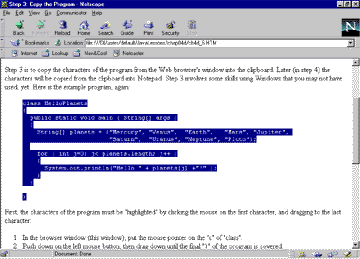
First, the characters of the Programm must be "highlighted" by clicking the mouse on the first character, und dragging to the last character:
- In the Browser Fenster (this window), put the mouse pointer on the "c" of "class".
- Push down on the left mouse button. Without lifting up on the mouse button, drag down until the final "}" of the Programm is covered.
- Lift up on the mouse button.
Be careful not to click the mouse again in the window or you will cancel your selection. (But you can always do it again.) After you have done this, you should see something like the following:
The last part of Step 3 is to copy the selected text into the Zwischenablage.
